Save Recovery Guide
03/25/2026
Note: Firing up certain mods might cause your vanilla save files to get overwritten or temporarily disappear. If you run into this issue, follow these steps:
1. Navigate to your local AppData directory: C:\Users\<YourUsername>\AppData\Roaming\SlayTheSpire2\steam (Tip: You can just press Win+R and type %appdata% to get there faster).
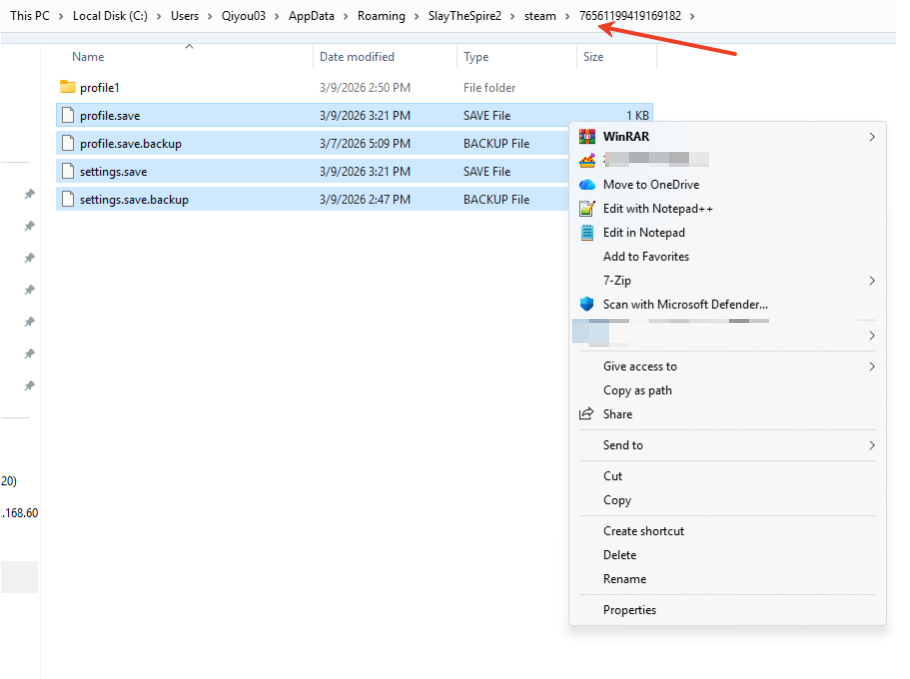
2. Open the folder with the long string of numbers (that's your Steam ID).
3. Select everything inside this folder EXCEPT the [modded] folder, and copy/paste all those vanilla files straight into the [modded] folder.
4. Boom! Your save data is successfully restored. You're good to go.
Было ли это полезно?

Да

Нет
Не можете найти ответ на интересующий вас вопрос?
Свяжитесь с намиМы используем файлы cookie и собираем обезличенные данные о пользователях для улучшения работы сайта, персонализации контента, анализа производительности и показа целевой рекламы. Нажимая кнопку «Принять», вы даете согласие на обработку таких данных. Подробнее.